文章目录
- Supervisor 的文档地址:http://www.supervisord.org/
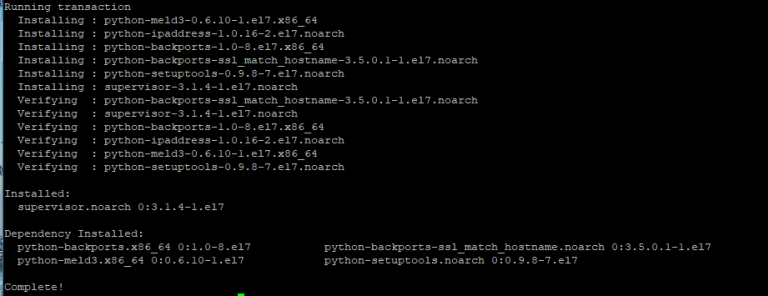
- yum install epel-release yum install supervisor 安装完成,如下图:
- Supervisor 的配置文件为:/etc/supervisord.conf ,Supervisor 所管理的应用的配置文件放在 /etc/supervisord.d/ 目录中,这个目录可以在 supervisord.conf 中配置。
- Supervisor 管理应用的进程,需要对每个应用进行配置。在 /etc/supervisor.d 中创建 helloworld.ini,每个应用对应一个配置文件即可。 下面是配置文件的示例: [program:helloworld] ;程序的名称 command = dotnet HelloWorld.dll ;执行的命令 directory = /root/www/ ;命令执行的目录 environment = ASPNETCORE__ENVIRONMENT=Production ;环境变量 user = root ;执行进程的用户 stopsignal = INT autostart = true ;是否自动启动 autorestart = true ;是否自动重启 startsecs = 1 ;自动重启间隔 stderr_logfile = /var/log/helloworld.err.log ;标准错误日志 stdout_logfile = /var/log/helloworld.out.log ;标准输出日志 创建好配置文件后,重启 Supervisor supervisorctl reload 或热重启,不会重启其他子进程 supervisorctl reread supervisorctl update 为确保没有错误,可以正常启动,使用前文提到的查看Supervisor状态的命令查看。或者查看要管理的进程是否启动,本例中可以使用下面的命令: ps -ef | grep HelloWorld.dll 或 ps -ef | grep dotnet
- 有两种方式可以管理进程,命令行和Web管理。 命令行 supervisorctl shutdown #关闭所有任务 supervisorctl stop|start program_name supervisorctl status #查看所有任务状态 Web管理 启用 Web 管理,首先将 /etc/supervisord.conf 配置文件中的 inet_http_server 节点取消注释。 修改后重启 Supervisor supervisorctl reload 在浏览器中打开地址,如下图所示。 下面是第三方Supervisor的Web管理工具: cesi : https://github.com/Gamegos/cesi suponoff: https://github.com/GambitResearch/suponoff gosuv: https://github.com/codeskyblue/gosuv supervisord-monitor: https://github.com/mlazarov/supervisord-monitor supervisord-monitor改进版:https://github.com/WisZhou/supervisord-monitor Measure Measure
Supervisor 的文档地址:http://www.supervisord.org/
yum install epel-release
yum install supervisor
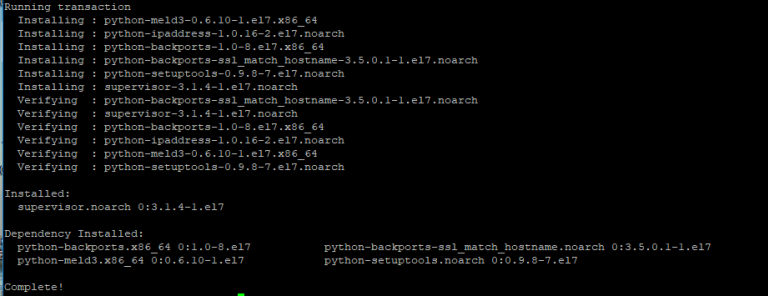
安装完成,如下图:
Supervisor 的配置文件为:/etc/supervisord.conf ,Supervisor 所管理的应用的配置文件放在 /etc/supervisord.d/ 目录中,这个目录可以在 supervisord.conf 中配置。

supervisord -c /etc/supervisor.conf
通过这种方式启动,服务器重启后 Supervisor 不会自动启动,不建议使用这种方式启动Supervisor。
安装 Supervisor 后,在 /usr/lib/systemd/system/ 目录中会有一个 supervisord.service 文件,内容如下:

如果没有,在该目录中创建一个,用下面的内容替换:
# supervisord service for sysstemd (CentOS 7.0+)
# by ET-CS (https://github.com/ET-CS)
[Unit]
Description=Supervisor daemon
[Service]
Type=forking
ExecStart=/usr/bin/supervisord
ExecStop=/usr/bin/supervisorctl $OPTIONS shutdown
ExecReload=/usr/bin/supervisorctl $OPTIONS reload
KillMode=process
Restart=on-failure
RestartSec=42s
[Install]
WantedBy=multi-user.target
启用开机启动
systemctl enable supervisord.service
启动Supervisor
systemctl start supervisord.service
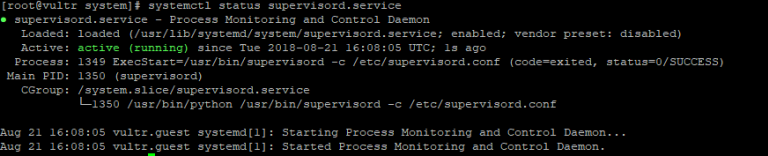
查看Supervisor状态
systemctl status supervisord.service
Supervisor 管理应用的进程,需要对每个应用进行配置。在 /etc/supervisor.d 中创建 helloworld.ini,每个应用对应一个配置文件即可。
下面是配置文件的示例:
[program:helloworld] ;程序的名称
command = dotnet HelloWorld.dll ;执行的命令
directory = /root/www/ ;命令执行的目录
environment = ASPNETCORE__ENVIRONMENT=Production ;环境变量
user = root ;执行进程的用户
stopsignal = INT
autostart = true ;是否自动启动
autorestart = true ;是否自动重启
startsecs = 1 ;自动重启间隔
stderr_logfile = /var/log/helloworld.err.log ;标准错误日志
stdout_logfile = /var/log/helloworld.out.log ;标准输出日志
创建好配置文件后,重启 Supervisor
supervisorctl reload
或热重启,不会重启其他子进程
supervisorctl reread
supervisorctl update
为确保没有错误,可以正常启动,使用前文提到的查看Supervisor状态的命令查看。或者查看要管理的进程是否启动,本例中可以使用下面的命令:
ps -ef | grep HelloWorld.dll
或
ps -ef | grep dotnet
有两种方式可以管理进程,命令行和Web管理。
命令行
supervisorctl shutdown #关闭所有任务
supervisorctl stop|start program_name
supervisorctl status #查看所有任务状态
Web管理
启用 Web 管理,首先将 /etc/supervisord.conf 配置文件中的 inet_http_server 节点取消注释。

修改后重启 Supervisor
supervisorctl reload
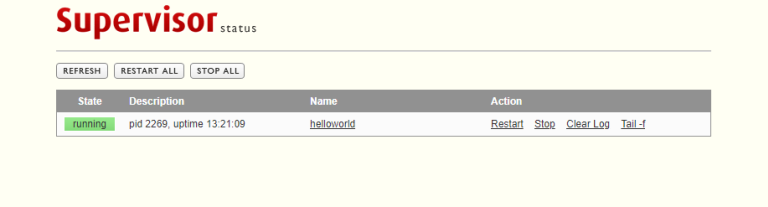
在浏览器中打开地址,如下图所示。
下面是第三方Supervisor的Web管理工具:
cesi : https://github.com/Gamegos/cesi
suponoff: https://github.com/GambitResearch/suponoff
gosuv: https://github.com/codeskyblue/gosuv
supervisord-monitor: https://github.com/mlazarov/supervisord-monitor
supervisord-monitor改进版:https://github.com/WisZhou/supervisord-monitor
Measure
Measure






暂无评论
要发表评论,您必须先 登录